Seat limits and what happens at the cap
How a product's per-account user limit is set, who it counts, what happens when the last seat is taken, and how to free a seat or raise the limit.
How seat limits work
Incenti staff can set a maximum number of users for a product on your account — a seat limit. Most accounts have no limit on any product; when a product does carry one, only Incenti staff can set or raise it. An Admin on your account cannot change it themselves.
The count behind the limit is the number of users who currently hold that product: everyone with Products access to it whose status is not Disabled, including anyone still Pending or Invited who hasn't signed in yet. Your account's screens show no seat counter — the only signals you'll see are the notification and the blocked-action message described below.
Who doesn't count
- A user who doesn't hold that product. The count is per product, so a teammate granted only Insights takes no EDOS seat, and someone with no products granted takes none at all.
- A disabled user. Disabling frees the seat immediately.
- A deleted user. They stop counting as soon as they're deleted — though deleting also blocks that email address forever, so disable instead unless you're sure. See What is kept, archived, and deleted.
Seats are per account
A limit belongs to one account and one product. If Incenti has linked sub-accounts under yours, they do not draw on your seats and you do not draw on theirs — each account has its own limit for each product it owns. See Parent accounts and sub-accounts.
When the last seat is taken
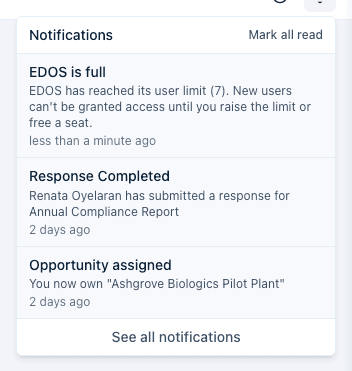
The moment a product's last seat is taken — the user count reaches the limit — every Admin on the account gets a notification and an email (except the admin who took the action, if it was an admin). Nobody is notified again after that first time; the notification only fires on the transition into full, not on every subsequent attempt.
When you try to add someone over the limit
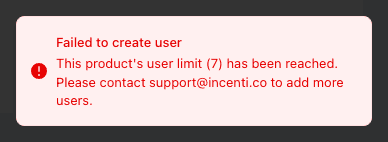
If a product is already full and you try to add a new user with that product, enable a disabled user who holds it, or grant it to an existing user under Products, the action is blocked. A message appears with the product's current limit and the support address to contact:
Nobody else is notified about a blocked attempt — it's shown only to you, as the person who tried it.
Free a seat or raise the limit
- Free a seat: open a user's profile and select Disable User, or open Products on their profile, select the pencil icon, uncheck the product, and Save. Either removes that user from the product's count immediately.
- Raise the limit: contact Incenti support at support@incenti.co. Incenti staff can also lower a limit; if the current count is already above a newly lowered limit, everyone who already has the product keeps it, but no one new can be added until the count drops back under the limit.
Common questions
Q: I got an email saying our product reached its user limit — did something break? A: No. It's an informational notice that the product's seats are now fully used. Existing users keep working normally; only adding or re-enabling a user for that product is blocked until you free a seat or raise the limit.
Q: Can I raise the limit myself? A: No. Seat limits are set by Incenti staff, not by account admins. Contact support@incenti.co to request a higher limit.
Q: Does an invited user who hasn't signed in yet take a seat? A: Yes. Anyone holding that product's access counts toward the limit as soon as they're granted it — Pending and Invited users included. Only a disabled or deleted user stops counting.
Q: Does a user with no products count toward our limit? A: No. Seats are counted per product, so someone who hasn't been granted that product — or who has no products at all — uses none of its seats.
Q: Does deleting a user free a seat? A: Yes, immediately. But deleting also permanently blocks that email address from ever being added to Incenti again, so disable the user instead unless you're certain.
Q: Do our sub-accounts share our seats? A: No. Seat limits are set per account and per product, so a sub-account's users never consume yours.
Q: I disabled a user but adding someone still says the product is full. Why? A: Disabling a user frees their seat immediately, so check that the user you disabled actually held that product (their Products list on the profile), and remember that Pending and Invited users still count. If the count still looks wrong, contact support@incenti.co.
Related
Last updated on