Roles and permissions
How your account role (Admin or Member) and your product access decide what you can see and do in Incenti, and what Incenti staff can see when they help with a support request.
The two kinds of access
What you can see and do in Incenti is controlled by two separate settings on your user:
- Your Account Role, Admin or Member, decides whether you can manage the account itself: its users and its details.
- Your Products decide which modules appear in your sidebar at all.
They are independent. A Member can have access to every product your account owns and still not be able to manage users, and an Admin can be granted only one product.
Account roles: Admin and Member
Every person on your account has an Account Role, chosen when they are added and shown on their profile.
| Can do | Admin | Member |
|---|---|---|
| Use the products they have been granted | Yes | Yes |
| Edit their own name, title, phone, and photo | Yes | Yes |
| Add users, send invitations, disable and enable users | Yes | No |
| Edit other users and set their Account Role and Products | Yes | No |
| Edit account details (name, logo, description, addresses) | Yes | No |
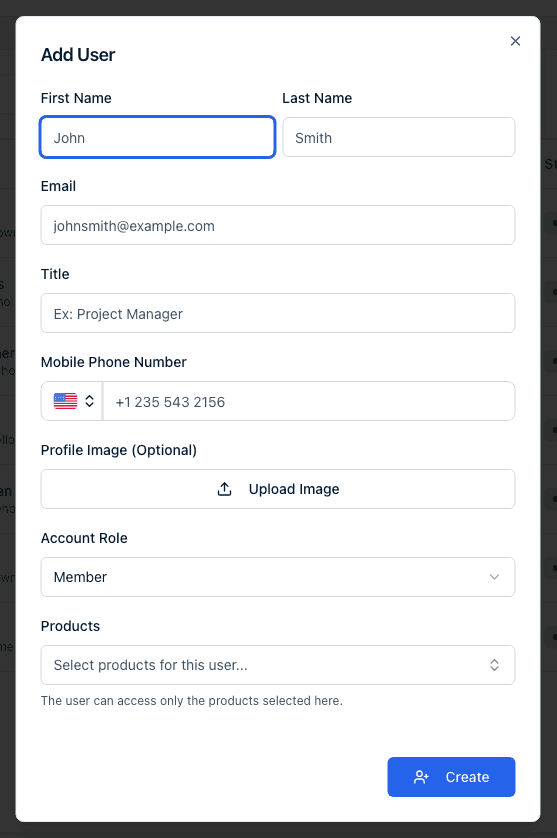
Adding users is an Admin task: only an Admin can choose a new user's Account Role and Products and send the invitation. See Invite and manage users for the full flow.
Product access
Each user is granted specific products, for example EDOS or Insights, when they are added, and an Admin can change them later from the user's profile. A module appears in your sidebar only when a product you have access to includes it, so two people on the same account, both Admins, can still see different sidebars. Some modules are also enabled per account rather than for everyone, so a module you have read about may not be available to your organization yet.
Economic development organization accounts also see Programs in the sidebar, where you manage the incentive programs you offer. It is the one module that depends on your account type rather than on product access.
Site selector accounts do not see Programs in the sidebar. It is only offered to economic development organizations, and no role or product grant adds it to a site selector account.
If you expect a module and do not see it, ask an Admin on your account to check your Products on your profile, or contact Incenti support.
What Incenti staff can see
Incenti support staff can open your account to troubleshoot a problem you have reported. That is a staff-only capability used for support: no user on your account, Admin or Member, can view another organization's account, and no one from another customer account can view yours. Each login belongs to exactly one account, so there is no account switcher for customers.
Common questions
Q: Why can't I see the Programs menu? A: Programs is shown only on economic development organization accounts. If your account is a site selector account you will not see it, whatever your role or product access.
Q: Can one login belong to two organizations? A: No. Each login belongs to exactly one account. If you need to work in a different organization's Incenti account, an Admin there has to add you as a separate user with a different email address.
Q: Why did someone from Incenti appear in our account? A: Incenti support staff can open a customer's account to help with a support request. Only Incenti staff can do this. No user on your account can view another organization's account.
Q: I'm an Admin but I still can't open a module. Why? A: Module visibility depends on your Products, not on your role. Open your profile and check the Products listed there. If the product you need is missing, another Admin can add it, and if your account does not own that product, contact Incenti support.
Q: What's the difference between my Account Role and my Products? A: Account Role (Admin or Member) controls whether you can manage users and account settings. Products control which modules you can see. You can be an Admin with one product or a Member with all of them.
Related
Last updated on