AI assistants in Incenti
Where each Incenti assistant lives, what data it can see, what it can and cannot change, how your conversations are stored, and the controls for chat history, clearing a chat, and the per-minute message limit.
Before you start
- Incenti has several assistants rather than one. Each one lives on a particular screen and can only see the data that screen is about.
- Which assistants you see depends on your products and, for Chats, on what Incenti has enabled for your account. If Chats is missing, your account does not have it yet.
- No assistant signs you in, emails anyone, or changes a record on its own. Where an assistant can change something, it proposes the change and you confirm it first.
The assistants and where they live
| Assistant | Where you open it | What it can see |
|---|---|---|
| Form Builder AI | The form builder, while you edit a form | The form you have open — its pages, sections, fields, rules, and scoring criteria |
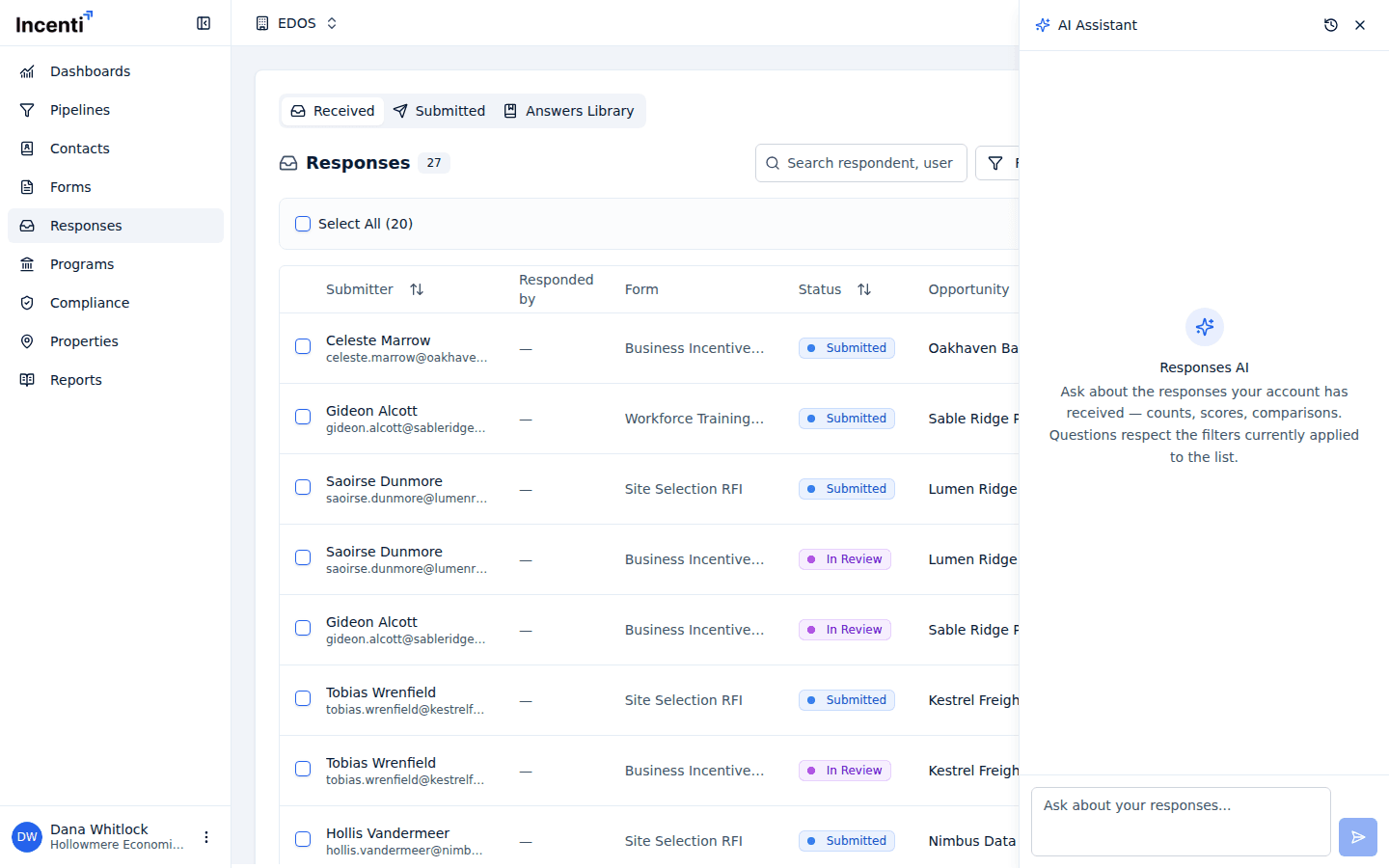
| Responses AI | AI Chat on the Responses page, or on one response | Responses on your account, their answers and scores, the forms behind them, and your Answers Library |
| Dashboard assistant | Build with AI on a dashboard | The dashboard you have open, its charts and filters, and the data sources charts can be built from |
| Incenti Support | The Help icon in the top bar | The help pages only, filtered to your role and account type, plus the screen you are on |
| Chats data assistant | Chats in the sidebar, on accounts that have it | Your account's opportunities, responses, tasks, users, contacts, and forms — read only |
| Insights Ask | Ask in the Insights workspace | Public economic, incentive-award, and district data — never your account's records |
Each assistant is scoped on the server, not by wording in the prompt: the Responses assistant cannot read another account's responses, and the Insights Ask assistant has no access to your contacts, responses, or pipeline at all.
What each one can change
- Form Builder AI proposes edits to the form you have open — adding a page, a field, a rule, a scoring criterion. You review and confirm before anything is written to the form.
- Responses AI can propose answer updates on a response; a confirmation card appears and nothing is saved until you accept it.
- Dashboard assistant proposes dashboard changes — add, update, remove, or move a chart, rename the dashboard or its description, set or clear the dashboard filters, and create, update, or delete a saved KPI. Each proposal arrives as a card you accept or decline.
- Incenti Support changes nothing. Its one action is handing your conversation to a person, and only after you agree to it. See Contact support.
- Chats and Insights Ask are read-only. They query and summarize; they never write.
What is stored, and who can see it
Every message you send and every answer you get back is saved to your account, per conversation. That is what makes Chat history work when you come back to a panel days later.
Conversations are private to the people in them:
- The assistant panels in Forms, Responses, Dashboards, and Support keep your threads to you. A teammate opening the same form or dashboard sees their own conversations, not yours.
- Chats conversations can be shared. Use Manage Participants on a chat to add teammates from your account; everyone in a chat sees its whole history. A chat always keeps at least one participant, and you cannot remove yourself from one.
- Insights Ask conversations are saved to your own Ask history.
Nothing you type is used to train a model, and Incenti never names the model behind an assistant in the product — model routing is an implementation detail that can change without changing what the assistants do.
Chat history, Clear chat, and Close chat
The assistant panels in Forms, Responses, Dashboards, and Support share one header with three buttons:
- Chat history lists your earlier conversations in that panel, newest first. Select one to reopen it. A conversation with nothing in it yet shows as Untitled chat.
- Clear chat starts a fresh conversation. It does not delete the old one — the previous thread stays under Chat history.
- Close chat closes the panel. Your conversation is kept and is there when you open the panel again.
In Chats, each conversation is its own row in the sidebar, with rename and delete on the row. Deleting a chat removes it for everyone in it.
Message limits and error messages
The assistant panels in Forms, Responses, Dashboards, and Support share a limit of 20 messages per minute per person. Go over it and the message is not sent; a toast reads "You're sending messages too quickly — wait a minute and try again." Wait a minute and send it again — nothing is lost and the conversation is unaffected.
If an answer fails for any other reason you see "The assistant couldn't respond. Please try again." Sending the question again is safe.
Insights Ask has no per-minute limit, but a single question is capped at 1,000 characters.
Common questions
Q: Can my admin read my conversation with an assistant? A: No. Conversations in the Forms, Responses, Dashboards, and Support panels are private to you, and there is no screen anywhere in Incenti that lists another user's threads. The exception is Chats, where every participant of a chat sees its full history.
Q: Which AI model does Incenti use? A: Incenti does not publish the model behind each assistant, and the product never names one. What matters for your data is in "What is stored, and who can see it" above: conversations stay on your account, and each assistant can only reach the data its screen is about.
Q: I'm getting "You're sending messages too quickly" — how long do I wait? A: About a minute. The limit is 20 messages a minute per person across the Forms, Responses, Dashboards, and Support panels. Your unsent message is put back in the box so you can send it again.
Q: Can an assistant change my data without asking? A: No. The Form Builder, Responses, and Dashboard assistants propose changes on a confirmation card and write nothing until you accept it. The Support, Chats, and Insights Ask assistants make no changes at all.
Q: Does the Insights assistant see our contacts or responses? A: No. Insights Ask answers from public economic, incentive-award, and district data only. It has no access to your account's records.
Related
Last updated on