Ask Insights (AI)
Ask natural-language questions about locations, costs, workforce, risk, incentives, and EDD regions, and get a grounded answer with a data table, sources, and follow-up suggestions, saved to a conversation you can revisit or share.
Before you start
- Ask is one of the Insights screens, alongside Explore, Analyze, Incentives, and Reports. Open Insights from the workspace switcher in the header. If Insights is not offered there, your account has not been granted that product; ask an account admin.
- Ask answers only from Insights data: state, metro, county, and city economic and demographic figures, incentive award and program data, and EDD region priorities. It has no access to your account's contacts, responses, opportunities, or other Incenti records.
Steps
Start a conversation
Open Ask. A new session shows What can I help you find? with a row of suggestion chips, each an example question grouped under a category (Site Selection, Comparison, Analysis, Research, Cost Analysis, Strategy, Incentives). Click a chip to ask it, or type your own question in the box at the bottom, labeled Ask about locations, costs, workforce, risk, or strategy…, and press Enter or click the send button.
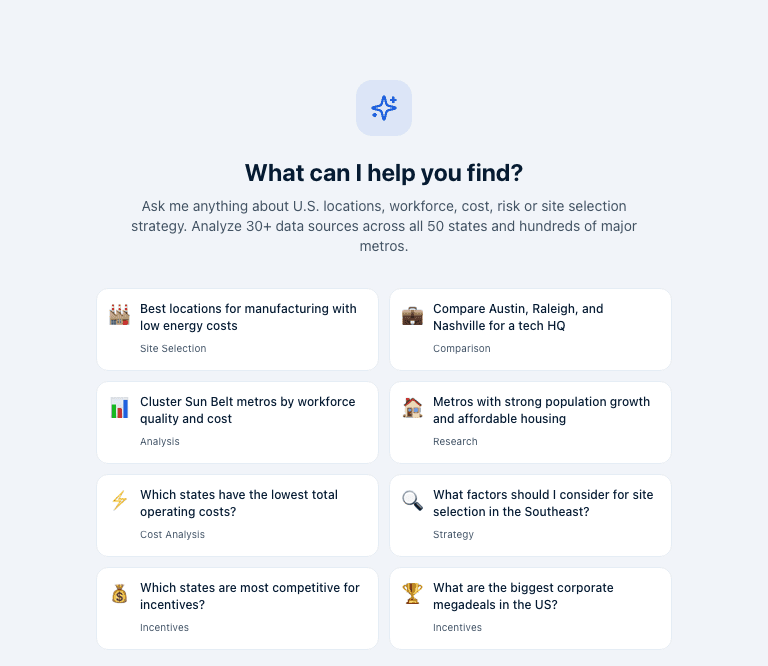
You'll typically ask Ask to benchmark your own market: "How does my county compare to nearby metros on workforce and cost?", "Which states are most competitive for incentives?", or "What are the biggest corporate megadeals in the US?" to see what competitors are offering.
You'll typically ask Ask to shortlist and compare candidate locations: "Best locations for manufacturing with low energy costs", "Compare Austin, Raleigh, and Nashville for a tech HQ", or "What factors should I consider for site selection in the Southeast?"
Read an answer
Each answer arrives as a card: a short summary, a data table (state, metro, or incentive figures, with score columns shown as colored badges), a "Why This Matters" callout with the analytical takeaway, the Sources the answer drew on, and 2–3 Follow up questions you can click to continue the conversation. Asking a follow-up sends it as the next message in the same conversation.
If live analysis is unavailable when you ask, Ask answers instead from a smaller catalog of stored answers and marks the card Cached answer.
Manage conversations
The Conversations panel on the left lists your past sessions by name, participant count, and how long ago the last message was sent. Click New conversation to start a fresh one. Open the ⋮ menu on a conversation (or, inside an open conversation, its own ⋮ menu) for Rename or Delete. Deleting removes the conversation and its messages for every participant, including anyone it's been shared with.

Open a conversation and use its ⋮ menu for Share to add specific account members or all account members as participants, or to remove a participant. A conversation starts visible only to the person who created it; sharing is what makes it visible to anyone else.
What happens next
- Every message you send and every answer Ask gives is saved to the conversation, so reopening it later shows the full history.
- Sending your first message in a new session creates the conversation and updates the page's URL so you can bookmark or share the link.
- A conversation is visible only to its participants: the creator, plus anyone added through Share. Other account members can't see it unless you share it with them.
Common questions
Q: Can it see my responses or pipeline? A: No. Ask only has access to Insights data (states, metros, counties, cities, incentive awards and programs, and EDD regions). It cannot read your account's contacts, responses, opportunities, or any other Incenti records, and it doesn't browse the web.
Q: Why did it say it has no data for my city? A: Ask only answers from data Incenti has ingested. A metric can be missing because the underlying source doesn't cover that place, or because it hasn't been ingested yet. Ask won't invent a number it doesn't have.
Q: Are my conversations visible to teammates? A: Only if you share them. A conversation starts visible only to you; use the Share option on the conversation to add specific teammates or the whole account.
Q: How current is the answer? A: Answers ground on the same state, metro, and county data shown in Explore, and the same incentive and EDD data shown in Incentives, each refreshed on its own schedule. A cached answer (marked Cached answer) comes from a stored catalog instead of live analysis.
Related
Last updated on