Response statuses
What every response status means, who sets it, which transitions are possible, how the Received tab filters them by default, and what Incenti records when a status changes.
Before you start
- A response is one submission of a form. Its status is the single badge shown in the Status column of the responses list and at the top of its detail page.
- Statuses split cleanly in two: the respondent drives everything up to Submitted, and the receiving account drives everything after it.
- Anyone on the receiving account can change a response's status — there is no separate admin permission for it.
What each status means
| Status | What it means | Who sets it |
|---|---|---|
| Pending | The response exists but nothing has been answered yet — a document that has just been turned into a form, or a request waiting to be started. | Incenti, when the response is created |
| In Progress | Answers have been saved but not submitted. | Incenti, on the first save; or the respondent on a document response |
| Ready for Submission | A document response the respondent has flagged as finished but not yet submitted. | The respondent, on a document response |
| Submitted | The respondent has submitted it. This is where review starts. | The respondent, by submitting |
| In Review | Reserved for a review step that Incenti does not currently set. | Nothing sets it today |
| Accepted | The receiving account accepted the response. Final. | The receiving account |
| Shortlisted | The receiving account selected it for further consideration. | The receiving account |
| Declined | The receiving account declined it. Final. | The receiving account |
| Stale | Reserved for drafts that have gone cold. Incenti does not currently set it. | Nothing sets it today |
In Review and Stale still appear in the Filter by Status list, and Stale is even part of the Received tab's default filter — but because nothing ever assigns them, those checkboxes always show a count of zero and are greyed out. You can safely ignore them.
The status the product calls Accepted is stored under the older name "Approved", so you may still see the word "approved" in an email to an applicant and in some exports. They mean the same thing.
How a response moves through them
Before submission
A response to an ordinary form starts life the first time the respondent saves any answers, in In Progress, and becomes Submitted when they submit. A response that Incenti created in advance starts at Pending and flips to In Progress on that first save.
A response created from an uploaded document has no submit button. Its respondent moves
it with the status dropdown on the detail page, forwards or backwards, between
Pending, In Progress, Ready for Submission, and Submitted. Choosing
Ready for Submission or Submitted checks the required questions first and refuses
the change with Cannot mark as <status> — Missing required fields: … when any are
blank. See
Create a response from a document.
After submission
The receiving account uses Change Status to pick Accept Response, Shortlist Response, or Decline Response, on one response or on a whole selection from the list. The rules are simple:
- The action is only available while the response is not already Accepted or Declined — both are final and cannot be undone.
- Shortlisted is not final: a shortlisted response can still be accepted or declined later.
- Accepting can also decline every other response to the same form in one step.
Nothing returns a submitted response to a draft status, and a respondent editing their answers afterwards does not reset the status — see Edit a response and fix field types.
Where statuses show up in the list
The Received tab filters by status before you touch anything. Its default shows only Submitted, In Review, Accepted, Shortlisted, and Stale — so drafts (Pending, In Progress, Ready for Submission) and Declined responses are hidden until you change the filter.
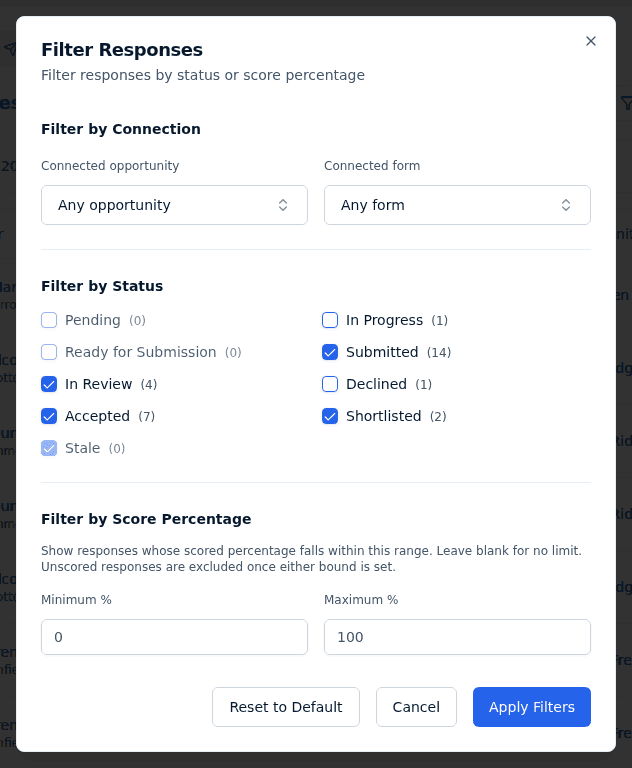
Two consequences worth knowing:
- The count badge next to the Responses heading counts only what matches your current filters and search — it is not the number of submissions a form has collected.
- Reset to Default in the Filter Responses dialog restores that default subset, not "everything".
The Submitted tab has no default status filter at all: drafts are the point there, so every status shows.
What Incenti records
Each review decision stamps its own timestamp on the response — when it was accepted, when it was shortlisted, when it was declined — alongside the date it was submitted. A decline also stores the reason you typed, which is what the applicant sees in their email. Moving a document response back out of Submitted keeps the original submission date as a historical record.
What happens next
- Ticking the email box when you accept, shortlist, or decline sends the response's primary contact an email with the subject Response Status Update for your form's name, headed Response Approved, Response Shortlisted, or Response Declined.
- Using Decline all other responses without typing a reason declines them with the automatic reason "Another response was accepted"; those applicants are only emailed if you also tick Send declined email notification.
- Once a batch of status emails has gone out, the person who made the decision gets a confirmation email and an in-app notice saying how many were delivered.
Common questions
Q: What's the difference between Accepted and Approved? A: None. Accepted is the label everywhere in the product; "approved" is the older internal name, and it still shows up in the wording of the applicant's email and in exported files.
Q: Nothing ever seems to go In Review or Stale — is that a bug? A: No. Both statuses exist in the system but nothing assigns them today, so their filter checkboxes always sit at zero. Review state is expressed with Shortlisted, Accepted, and Declined instead.
Q: Can I move a response back from Accepted or Declined? A: No. Those two are final and the Change Status button disappears once a response reaches either. Shortlisted is the one review status you can still change.
Q: Who can change a response's status? A: Anyone on the account that owns the form. Respondents never see the status actions on a response they submitted, only the badge.
Q: A draft has been sitting in In Progress for months — will it expire? A: No. Drafts never time out and are never swept to Stale. If a form is closed, the respondent simply can't submit the draft any more.
Related
Last updated on