Manage your account's addresses
Open your account's Addresses tab to view every address on your organization's record, and, as an account admin, add, edit, or delete them.
Before you start
- Everyone signed in to your account can view its addresses. You must be an account admin to add, edit, or delete one.
- An address on your account record identifies your organization — for example, its main office. It's informational only; it doesn't fill in forms, property records, or anything else in Incenti.
Steps
Open the Addresses tab
-
Click your name at the bottom of the left sidebar, then choose Account.
-
Select the Addresses tab. You can also reach it directly by adding
?tab=addressesto your account page's URL.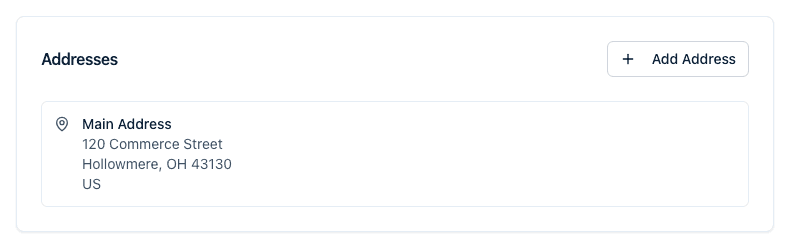
Add an address
-
Click Add Address — at the top right of the Addresses card if it already lists an address, or in the middle of the card if it's empty.
-
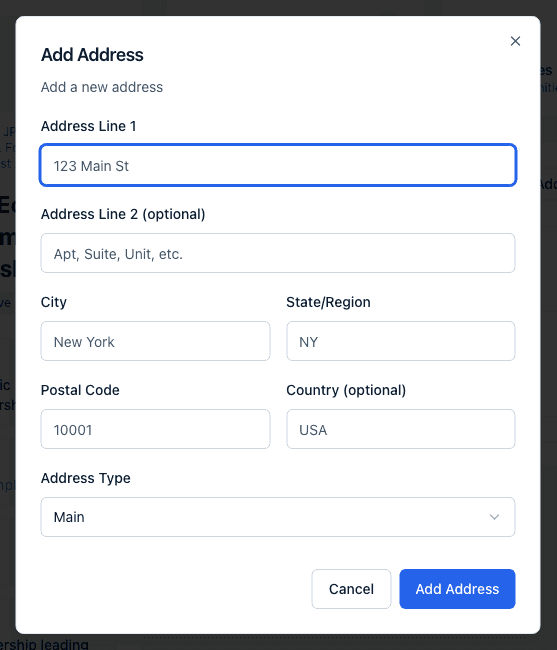
Fill in the Add Address dialog:
- Address Line 1, City, State/Region, and Postal Code are required.
- Address Line 2 (optional) and Country (optional) are optional.
- Address Type — Main, Mailing, Billing, or Other.
-
Click Add Address to save, or Cancel to close the dialog without saving. A confirmation toast reads "Address added successfully."
Edit or delete an address
- Hover over an address in the Addresses card to reveal a pencil and a trash icon.
- Click the pencil to open Edit Address, change any field, and click Update Address to save. An "Address updated successfully" toast confirms the change.
- Click the trash icon to open the Delete Address confirmation: "Are you sure you want to delete this address? This action cannot be undone." Click Delete to remove it, or Cancel to keep it. An "Address deleted successfully" toast confirms the deletion.
What happens next
Adding, editing, or deleting an address saves immediately — there's no draft or approval step. Every user on the account sees the change the next time they view the Addresses tab, and no notification is sent.
Common questions
Q: Why don't I see the Add Address button? A: Only account admins can add, edit, or delete an account address. Everyone else on the account can view the Addresses tab but won't see the Add Address button or the edit and delete icons.
Q: Does the account address fill in my forms or property records? A: The account's addresses identify your organization and are offered as your organization's address when Incenti autofills a response on your behalf. They don't populate property records, and contacts and organizations keep their own separate addresses.
Q: A user's profile has an Addresses tab — is that the same list? A: No. That tab shows addresses recorded against that individual user, and it only appears when they already have one; there's no way to add one from a profile. The addresses here belong to the organization. See Update your profile and theme.
Q: Can I have more than one Main address? A: Yes. Address Type is just a label with no uniqueness rule behind it, so you can add as many Main (or Mailing, Billing, or Other) addresses as you need.
Related
Last updated on