Opportunity statuses
The Status list an opportunity uses, which differs for economic development organizations and site selection firms, how each status is categorized, how Status relates to a pipeline's columns, and who is notified when it changes.
Before you start
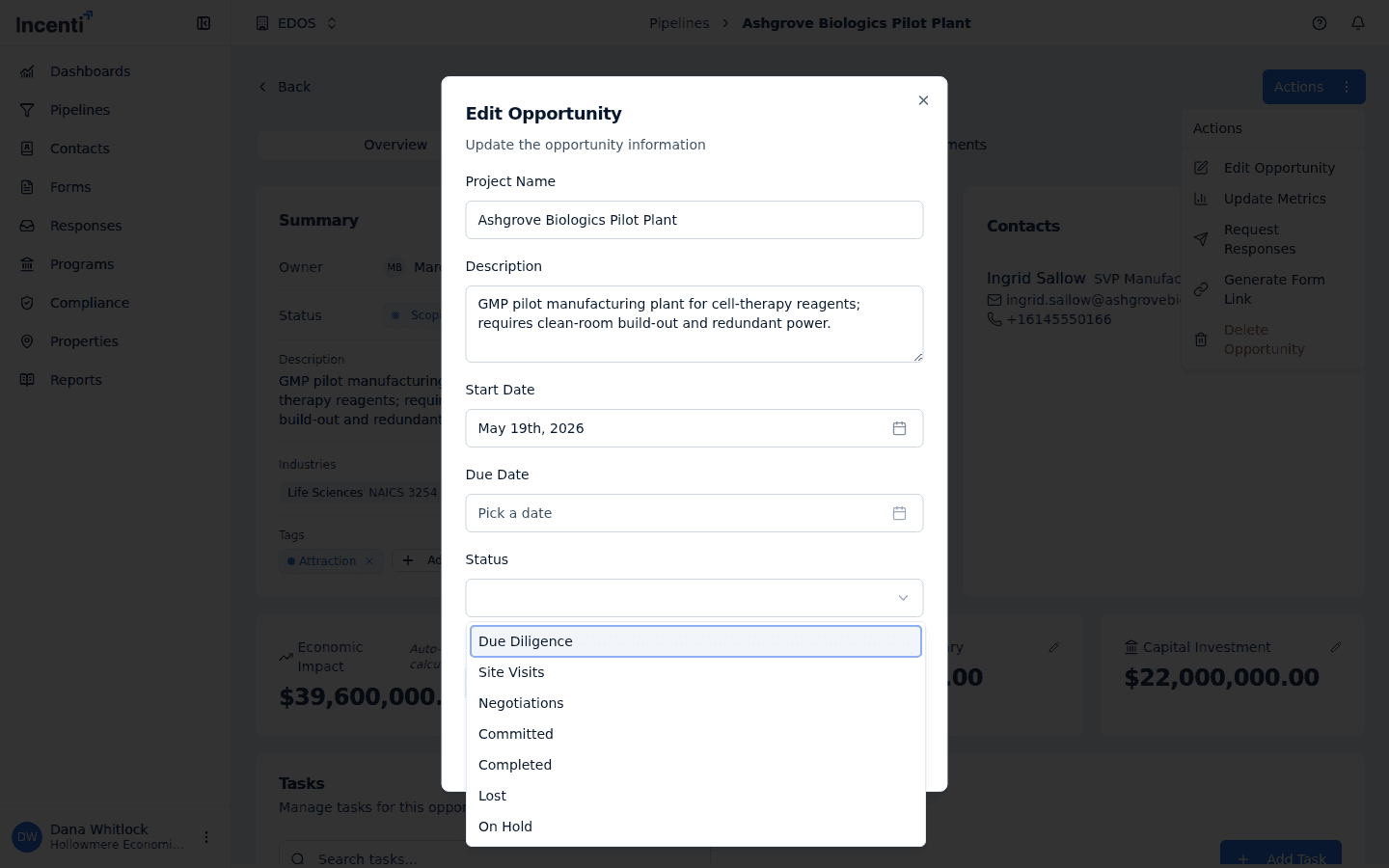
- Every opportunity has a Status field on its Summary card. It is set once when the opportunity is created and changed afterwards through Actions → Edit Opportunity, which only account admins see.
- The list of statuses is fixed and comes from Incenti — it isn't something your account adds to or renames. The columns on a pipeline board are yours to change; those are a different thing, covered below.
- Which list you see depends on your account type.
The status list for your account type
Each status belongs to a category — Active (in play), Inactive (paused), or Closed (finished) — which is how the rest of the portal reasons about it. New opportunities start at the first status in your list, whether they're created from a pipeline board's New opportunity dialog or by promoting a response.
| Status | Category | Typically means |
|---|---|---|
| Due Diligence | Active | The starting status. You're working the project |
| Site Visits | Active | Conducting site visits |
| Negotiations | Active | In negotiations |
| Committed | Active | The client has committed |
| Completed | Closed | The project is complete |
| Lost | Closed | The project was lost |
| On Hold | Inactive | Paused, with no work happening now |
| Status | Category | Typically means |
|---|---|---|
| Scoping | Active | The starting status. Scoping the search |
| RFIs Out | Active | RFIs have gone out |
| Responses In | Active | Responses are coming back |
| Shortlisted | Active | Sites are shortlisted |
| Due Diligence | Active | Performing due diligence |
| Completed | Closed | The search is complete |
| Lost | Closed | The search was lost |
| On Hold | Inactive | Paused, with no work happening now |
Change an opportunity's Status
Open the opportunity, choose Actions → Edit Opportunity, pick a new value under Status, and save. Members don't see the Actions button, so on most accounts changing Status is an admin's job.
Status versus pipeline columns
These are two separate things, and neither updates the other:
- Status is a property of the opportunity itself, from the fixed list above. It shows on the Summary card and travels with the opportunity.
- A pipeline column is where the opportunity's card sits on a board. Your account creates, renames, recolours, and reorders columns freely, and each column has its own Active/Inactive/Closed category and — for closed columns — a Won or Lost outcome.
So dragging a card into Won doesn't change the opportunity's Status, and editing Status to Completed doesn't move the card. If your team relies on one of them, agree on which and keep the other in step by hand. Compliance keys off the column's Won outcome, not the Status field.
Moving an opportunity to a different pipeline (a card's ⋮ → Move to another pipeline) asks which column it should land in there and leaves its Status exactly as it was.
Who is notified
Changing Status through Edit Opportunity sends one in-app notification — "Status updated" — to the opportunity's Owner, in the bell only. You're never notified about your own change, and an owner who has just been assigned the opportunity in the same save gets the assignment notification instead.
Dragging a card between board columns notifies nobody, and no email is sent for either kind of change. See Notifications and the bell.
Common questions
Q: Where is "Scoping" on my list? A colleague at another organization has it. A: Scoping is the first status for site selection accounts. Economic development organization accounts start at Due Diligence instead. The two lists overlap only at Due Diligence, Completed, Lost, and On Hold.
Q: Can we add our own statuses or rename these? A: Not this list — it's fixed per account type. What you can shape freely is your pipeline's columns: add, rename, recolour, reorder, archive, and delete them from the board or from Settings. See Pipelines.
Q: I changed the Status but the card didn't move on the board. A: That's expected. Status and the board column are tracked separately; changing one never moves the other. Move the card yourself if the board should reflect the change.
Q: What are Lead and RFI statuses? A: There are separate status lists stored for leads and RFIs, but nothing in the portal creates an opportunity as a lead or an RFI today — everything you create is a project, and only the project list above applies.
Related
Last updated on