Incentive Intelligence: awards and programs
Explore Incenti Subsidy Intelligence, a proprietary dataset of disclosed incentive awards across 51 jurisdictions, alongside the Programs Offered catalog of verified current state programs, competitiveness scores, megadeals, and company deal comps.
Before you start
- Your account needs the Insights product. If your workspace switcher doesn't show Insights, ask an account admin to check your product access.
- Open Incentives from the Insights sidebar (alongside Ask, Explore, Analyze, and Reports). The screen is branded Incentive Intelligence, subtitled "Proprietary subsidy data across 51 jurisdictions."
- This screen covers two different datasets. Awards (the Overview, Map, Compare, Industries, Companies, Megadeals, and Explorer tabs) is Incenti's proprietary compiled record of disclosed historical incentive deals — what companies actually won. Programs Offered (the Programs tab) is a separate, verified catalog of the incentive programs each state currently offers. The two are not the same list: an award on record doesn't guarantee the program that produced it is still active, and a listed program doesn't guarantee any company has taken it yet.
Steps
Incentive Intelligence has eight tabs: Overview, Map, Programs, Compare, Industries, Companies, Megadeals, and Explorer.
Use Incentive Intelligence to benchmark your own state's competitiveness against peers on Compare and the Map, see what competing states actually awarded to land specific companies, and pull comps from Companies or Megadeals when you're building your own case to a prospect. Programs Offered doubles as a check on what nearby states are currently offering.
Use Incentive Intelligence to see what a company like yours has actually received in similar deals (Companies, Megadeals, Explorer), which states run the most generous or active incentive environments (Overview, Map, Compare), and to discover which specific programs a candidate state currently offers on the Programs tab before you approach it.
Overview
The landing tab. Four KPI cards summarize the awards dataset: Total Tracked Value, Megadeals, Corporate Parents, and Year Range (1974 onward, 51 jurisdictions).

Below the KPIs:
-
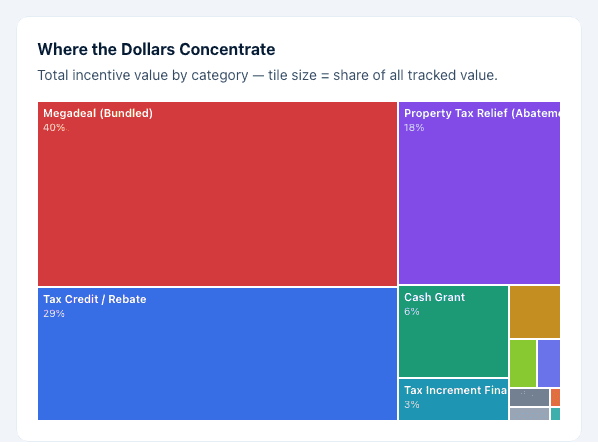
Where the Dollars Concentrate — a treemap of total incentive value by category, tile size showing each category's share.
-
Annual Award Value — a line chart of tracked value by year.
-
Momentum Leaders — states with the largest share of their lifetime incentive value awarded in the last five years. Click a state to open its profile.
-
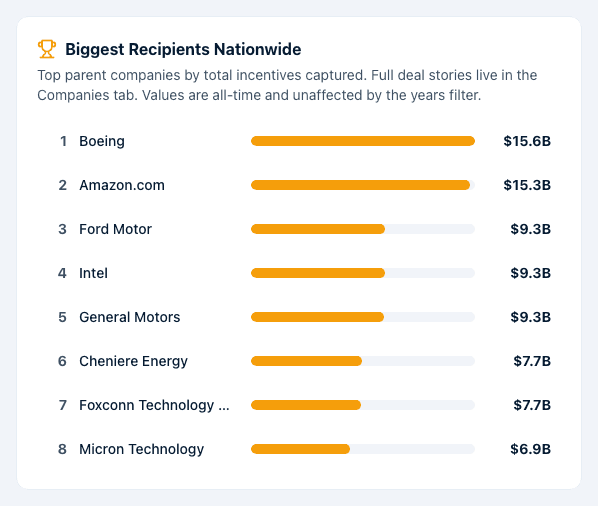
Biggest Recipients Nationwide — the top parent companies by total incentives captured, with full deal stories on the Companies tab.
-
Incentive Competitiveness Score — State Rankings — every state and DC ranked by ICS, with its tracked value and a capped badge where a per-state record cap applies. Click any state to open its profile.
The Incentive Competitiveness Score (ICS) is a proprietary 0–100 composite built from award generosity, typical deal size, recency of activity, and program diversity. States with limited disclosure (too few records to score reliably) are flagged and fall back to national averages for part of the score.
Map
Shows the same state rankings as a choropleth. A Shade by control switches the fill between Shade by: ICS and Shade by: Programs offered. The legend reads 0 — 100 for ICS shading and separately flags Limited disclosure states. Click any state to open its full incentive profile.
Programs
Programs Offered: verified state incentive programs, separate from the awards dataset described above. Use the jurisdiction picker ("Search all 51 jurisdictions") to choose a state; its programs then list with each program's category badge, name (linking out to the program's own page), administering agency, Benefit, Eligibility, a status chip (programs are ACTIVE by default; a program that has ended shows a Sunset chip and renders muted, hidden unless you turn on Include sunset programs), and its last-verified date. Filter by industry chips or by category group, and reset with Reset filters. Click Create report (top of the card, or the in-card scoped button once filters are active) to generate a report for the selected jurisdiction.
Compare
State Incentive Benchmarking: compare 2–4 states' incentive environments side by side. Click Add state to build the comparison, up to four at once. The comparison table shows ICS Score, Total Tracked Value, Typical (Median) Award, Large-Award Share, Awards on Record, and Dominant Category, alongside an ICS component breakdown and an annual value trend overlay. A Years range selector narrows most figures; ICS and Large-Award Share stay computed across all years regardless (marked with a footnote). Once two or more states are added, click Export Report.
Industries
Industry rollups of the awards dataset: classified value and share, a drillable hierarchy of sectors down to individual awards, and a state crosstab view. Each award is classified by the company entity that received it; subsidiaries are classified on their own activity rather than inheriting the parent's industry. A year-range filter narrows the figures.
Companies
Company Deal Comps: search any parent company ("Search companies (e.g. Amazon, Intel, Boeing)...") to see every incentive it has captured nationwide, or browse Biggest Incentive Recipients, the top 25 parent companies nationwide by total incentives captured. Click any company for its full deal story: award timeline, top states, category mix, largest individual awards, and entity/subsidiary classifications.
A company's detail page has its own Export Report button.
Megadeals
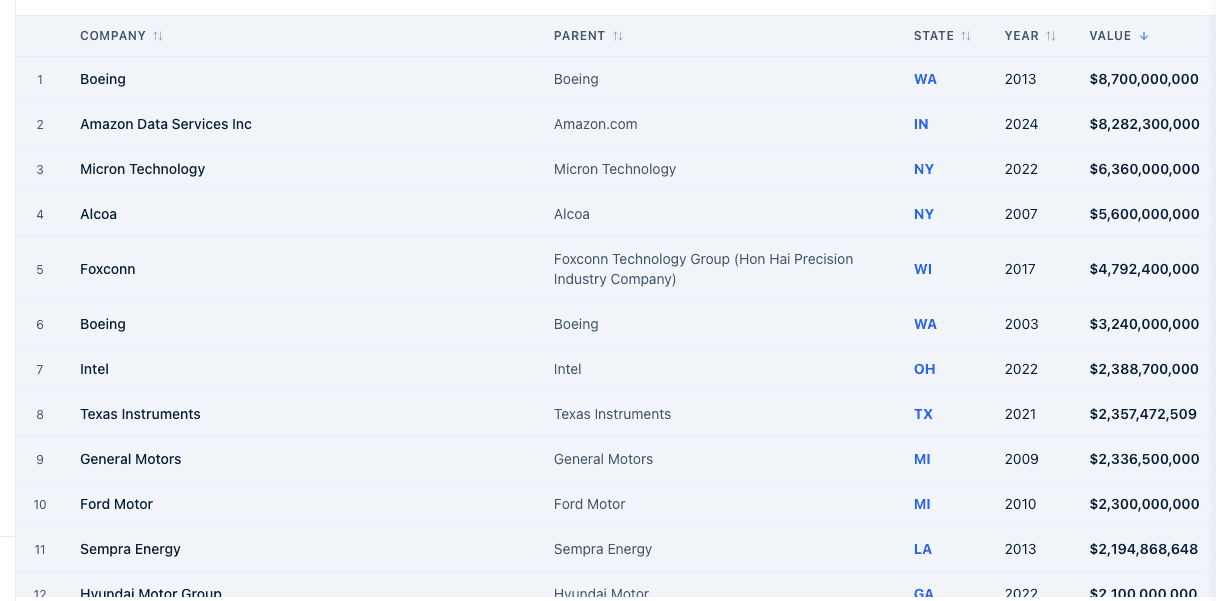
Megadeals Board: the largest bundled incentive deals, filterable by state and year, searchable by company. Click a column header to sort. Click Export Report to generate a report of the current board.
Explorer
Record Explorer: pick a state from Select State... to browse its individual award records. Once a state is chosen, filter by company search, category, tier, and a Years range, and sort any column (Company, Parent, Year, Value, Category, Tier, Source). Up to 500 rows show at once; a note tells you when more exist. Click State Report to export the current state's records.
What happens next
- The Years range selector appears on Overview, Compare, and Explorer. On Overview and Compare it narrows tracked value, category mix, the annual trend, and momentum; ICS and Large-Award Share stay computed across all years no matter what range you pick (a footnote marks this). Biggest Recipients Nationwide is explicitly all-time and unaffected by the years filter. On Explorer the range filters the underlying award records directly, alongside your other filters.
- Clicking a state anywhere (Map, Overview rankings, Momentum Leaders) opens that state's incentive profile: its ICS, component scores, category mix, year trend, top recipients, megadeals, and its own Programs Offered card (a compact read of the same catalog shown on the Programs tab).
- Reports launched from any tab (Create report, Export Report, State Report) generate in the background and land in your report history, the same as other Insights reports.
Common questions
Q: Where does this data come from? A: The awards side is Incenti's own proprietary compiled dataset of publicly disclosed incentive awards across 51 jurisdictions, going back to 1974, updated periodically. The Programs Offered catalog is a separately maintained, verified list of current state incentive programs.
Q: Why is a state marked "capped" or "Limited disclosure"? A: Capped means a per-state record cap applies to that state's awards on record, so its award count isn't directly comparable to an uncapped state. Limited disclosure means the state has too few disclosed award records to score reliably, so part of its ICS falls back to national averages; it's flagged wherever the score appears (Overview rankings, Map legend, state profile, Compare table).
Q: Why doesn't the Years filter change the Biggest Recipients list? A: That card is explicitly all-time by design, so a fixed answer to "who has captured the most, ever" stays stable no matter what range you've set elsewhere on the page.
Q: Does this include local (city and county) incentives, or only state programs? A: Both. Each award on record is tagged by the level of government that granted it, and the Source column in Explorer shows whether an award came from a state or a local source. Programs Offered, by contrast, lists state-level programs only.
Q: Is my own account's incentive program listed under Programs Offered? A: Programs Offered is a separate, independently verified catalog and isn't built from what your account manages in Programs. If your account is an economic development organization, the incentive programs you administer under Programs in the main workspace are managed there, not here.
Related
Last updated on